JWT Authentication with RBAC in Go Using Gin

In modern web and API application, authentication and authorization are two critical parts to have to secure its access . One common and secure method to handle both is by using JWT (JSON Web Token) for authentication and RBAC (Role-Based Access Control) for authorization.
We will create a simple Go apps using Gin framework. In addition, we also implements a JWT based authentication and authorize access using RBAC.
No worries, each step will be explained clearly, using working code, so you can follow along and understand it for your own projects.
What is JWT ?
Have you heard JWT? It stands for JSON Web Token. It is a compact and secure way to share information between parties and widely used for authenticating users in web or API applications.
Each JWT toke n contains:
Header. defines the signing algorithm and token type.
Payload. includes claims such as user ID or role.
Signature. ensures the token hasn’t been tampered with.
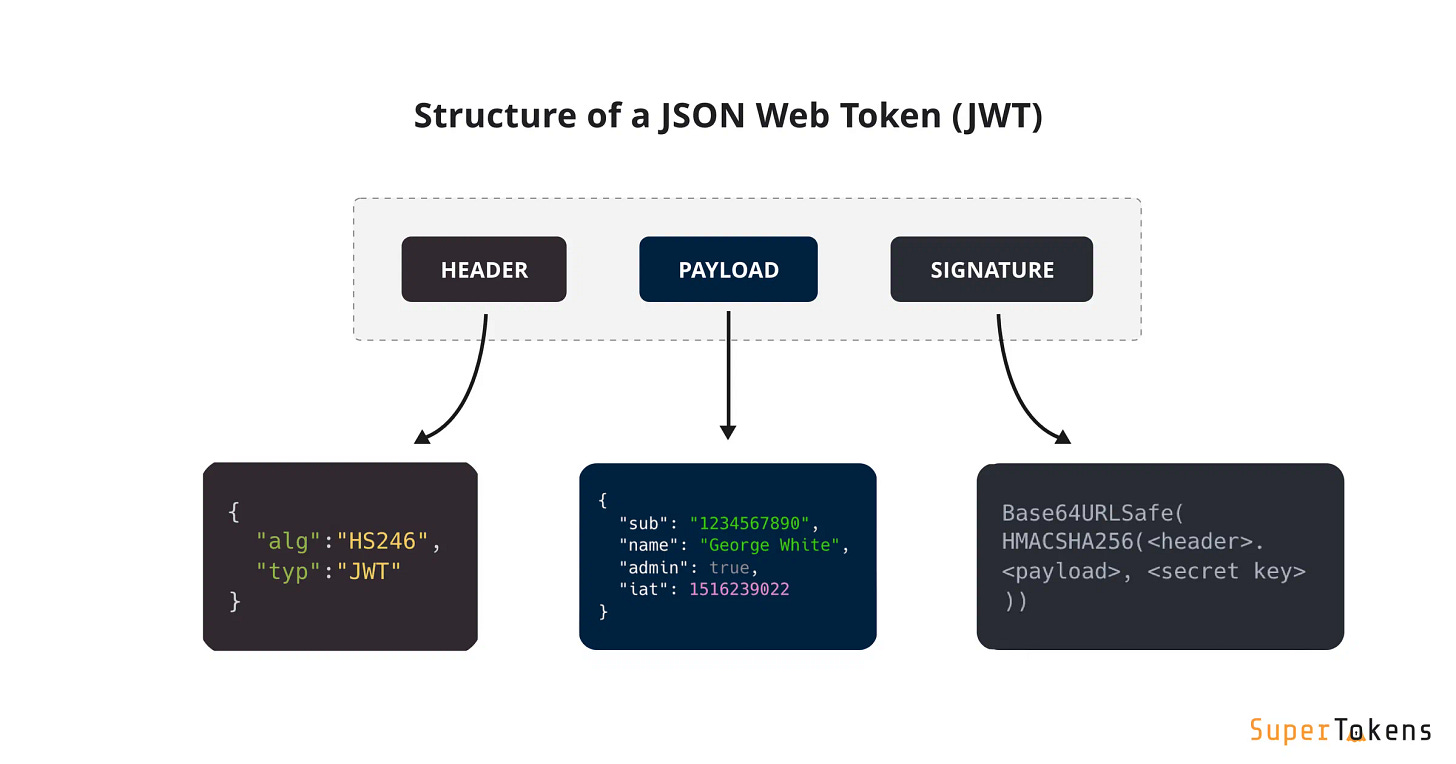
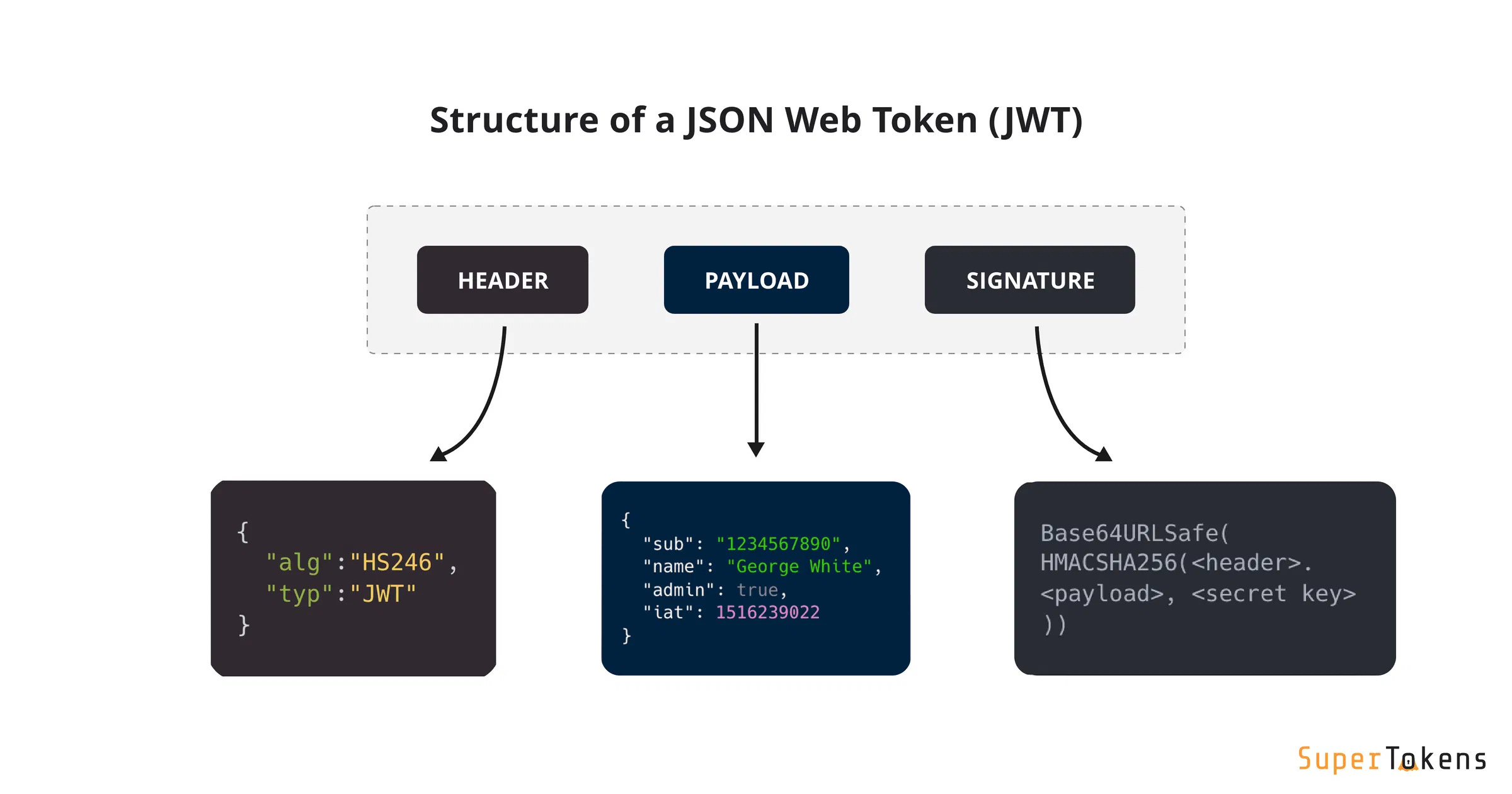
Once the token is generated, you can send the JWT to the client, and the client includes it in the Authorization header of future requests.
What is RBAC?
Next is RBAC, I stands for Role-Based Access Control. You assign each user a role, like admin or user and then restrict or allow access to specific routes based on that role.
As an example:
Admins can access /admin.
Users and admins can access /dashboard.
Anyone can access /public.
Step by Step: Build a JWT and RBAC System in Go
We will walk through building a Go application with the following features:
A login endpoint that returns a JWT
A middleware that verifies the JWT and role
Role-protected routes
Step 1: Set Up the Project
First, create a new folder and initialize the Go module:
mkdir go-jwt-rbac
cd go-jwt-rbac
go mod init go-jwt-rbac
After that, install the required packages:
go mod tidyor with
go get github.com/gin-gonic/gin
go get github.com/golang-jwt/jwt/v4
Step 2: Write the Code
Now create a main.go file and copy in the code below:
package main

import (
	"github.com/gin-gonic/gin"
	"github.com/golang-jwt/jwt/v4"
)

type User struct {
	ID   uint   `json:"id"`
	Name string `json:"name"`
	Role string `json:"role"`
}

type Claims struct {
	UserID uint   `json:"user_id"`
	Role   string `json:"role"`
	jwt.RegisteredClaims
}

var users = map[uint]User{
	1: {ID: 1, Name: "Admin", Role: "admin"},
	2: {ID: 2, Name: "User", Role: "user"},
}

// Middleware to restrict access by role
func RequireRole(allowedRoles ...string) gin.HandlerFunc {
	return func(c *gin.Context) {
		tokenString := c.GetHeader("Authorization")
		if tokenString == "" {
			c.JSON(401, gin.H{"error": "Token required"})
			c.Abort()
			return
		}

		claims := &Claims{}

		token, err := jwt.ParseWithClaims(tokenString, claims, func(token *jwt.Token) (interface{}, error) {
			return []byte("secret-key"), nil
		})

		if err != nil || !token.Valid {
			c.JSON(401, gin.H{"error": "Invalid token"})
			c.Abort()
			return
		}

		for _, role := range allowedRoles {
			if claims.Role == role {
				c.Set("user_id", claims.UserID)
				c.Set("role", claims.Role)
				c.Next()
				return
			}
		}

		c.JSON(403, gin.H{"error": "Insufficient permissions"})
		c.Abort()
	}
}

func main() {
	r := gin.Default()

	// Public route
	r.GET("/public", func(c *gin.Context) {
		c.JSON(200, gin.H{"message": "Public access"})
	})

	// Route accessible only by admin
	r.GET("/admin", RequireRole("admin"), func(c *gin.Context) {
		c.JSON(200, gin.H{"message": "Admin area"})
	})

	// Route accessible by admin and user
	r.GET("/dashboard", RequireRole("admin", "user"), func(c *gin.Context) {
		role := c.GetString("role")
		c.JSON(200, gin.H{
			"message": "Dashboard access",
			"role":    role,
		})
	})

	// Login endpoint to issue JWTs
	r.POST("/login", func(c *gin.Context) {
		var req struct {
			UserID uint `json:"user_id"`
		}
		if err := c.ShouldBindJSON(&req); err != nil {
			c.JSON(400, gin.H{"error": "Invalid request"})
			return
		}

		user, exists := users[req.UserID]
		if !exists {
			c.JSON(404, gin.H{"error": "User not found"})
			return
		}

		claims := Claims{
			UserID: user.ID,
			Role:   user.Role,
		}
		token := jwt.NewWithClaims(jwt.SigningMethodHS256, claims)
		tokenString, err := token.SignedString([]byte("secret-key"))
		if err != nil {
			c.JSON(500, gin.H{"error": "Could not generate token"})
			return
		}

		c.JSON(200, gin.H{"token": tokenString})
	})

	r.Run(":8080")
}
Let’s understand the code
func RequireRole(allowedRoles ...string) gin.HandlerFunc {This function returns a gin.HandlerFunc, which is middleware.
It accepts one or more allowed roles as arguments (e.g., "admin", "user").
tokenString := c.GetHeader("Authorization")Retrieves the token from the HTTP Authorization header.
Without this token, the server can’t verify who the user is.
claims := &Claims{}
token, err := jwt.ParseWithClaims(tokenString, claims, func(token *jwt.Token) (interface{}, error) {
	return []byte("secret-key"), nil
})
Parses and validates the JWT.
Fills in the Claims struct, which contains the user’s role and ID.
for _, role := range allowedRoles {
	if claims.Role == role {
		c.Set("user_id", claims.UserID)
		c.Set("role", claims.Role)
		c.Next()
		return
	}
}
Core RBAC logic: Loops over all allowed roles.
If the role in the JWT (claims.Role) matches any of them, it:
Stores user ID and role in the request context using c.Set().
Calls c.Next() to allow the request to continue.
If no match is found, access is denied.
Step 3: Now Run the App
Start the server with the following command.
go run main.go
Step 4: Test the Endpoints
Login
Send a POST request to /login with a user ID to get a token:
curl -X POST http://localhost:8080/login \
  -H "Content-Type: application/json" \
  -d '{"user_id": 1}'
You willl get a response like:
{ "token": "eyJhbGciOiJIUzI1NiIs..." }
Copy the token and use it to access protected routes.
Access a Public Route
This route doesn’t need a token:
curl http://localhost:8080/publicAccess an Admin-Only Route
Replace YOUR_TOKEN_HERE with the token from login:
curl http://localhost:8080/admin \
  -H "Authorization: YOUR_TOKEN_HERE"
If the token is valid and belongs to an admin, you’ll get:
{ "message": "Admin area" }
If not, the server will respond with:
{ "error": "Invalid token" }
Access the Dashboard (admin or user)
curl http://localhost:8080/dashboard \
  -H "Authorization: YOUR_TOKEN_HERE"
This route works for both admin and user roles.
To sum up..
Congrats.You have just built a simple JWT authentication system with role-based access in Go. This pattern is a solid foundation for building secure APIs. As next steps, consider:
Adding token expiration and refresh logic
Using HTTPS for secure transport
Storing users and roles in a real database
Using more secure signing keys from environment variables
Note: complete code can be retrieved from https://github.com/novrian6/go_jwt_rbac.git